Variables reference
Every {{ }} variable you can use in Invoicepak email subjects, messages and PDF file names, what each becomes, and copy-paste examples.
A variable is a placeholder in double curly brackets, such as {{order.number}}. When Invoicepak sends an invoice, it replaces the variable with that order's details. For example, Invoice {{order.number}} becomes Invoice #1001.
Where you can use variables
Variables work in three fields in Settings:
| Field | Section | Guide |
|---|---|---|
| Subject | Customer email | Write the subject and message |
| Message body | Customer email | Write the subject and message |
| PDF file name | Invoice PDF | PDF file name |
The hint under each field lists the variables most useful there:
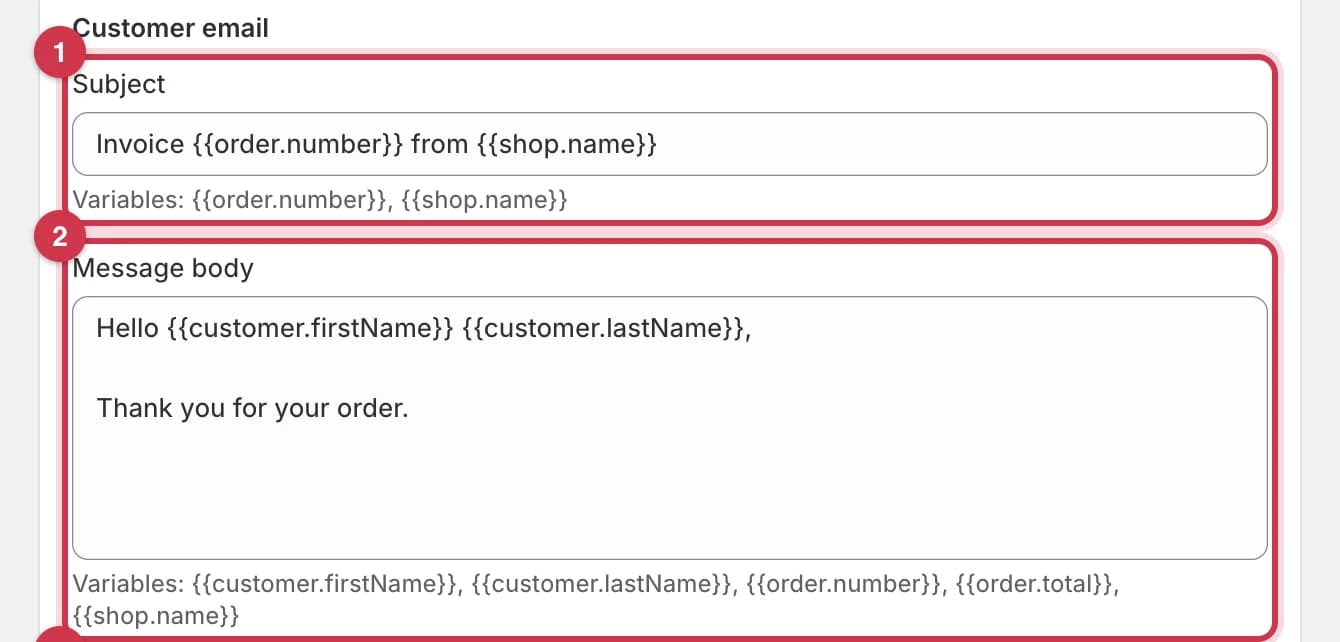
- Subject:
{{order.number}},{{shop.name}} - Message body:
{{customer.firstName}},{{customer.lastName}},{{order.number}},{{order.total}},{{shop.name}}

PDF file name: {{order.number}}, {{shop.name}}, {{customer.lastName}}
Every variable in the next section works in all three fields, not just the ones listed in the hints.
Variables don't work in:
- the Footer message text, where curly brackets are removed,
- text you type into a template in the template editor,
- Business details.
Every variable at a glance
Your store
| Variable | What it becomes | Example |
|---|---|---|
{{shop.name}} | Your Company name from Business details, or your Shopify store name if that's empty | Acme Coffee Roasters Ltd. |
{{shop.email}} | Your Company email from Business details, or your Shopify store email if that's empty or you're on Free | hello@acmecoffee.com |
{{shop.address}} | The street, city and country from your Shopify store address (Settings → Store details in the Shopify admin) | 12 Market Street, London, United Kingdom |
The order
| Variable | What it becomes | Example |
|---|---|---|
{{order.number}} | The order number, including the # | #1001 |
{{order.date}} | The date and time the order was created, in a technical format (see below) | 2026-10-06T14:23:05Z |
{{order.total}} | The order total, with currency | $52.02 |
{{order.subtotal}} | The subtotal before shipping and tax | $44.00 |
{{order.tax}} | The total tax | $3.52 |
{{order.shipping}} | The shipping cost | $4.50 |
The customer
| Variable | What it becomes | Example |
|---|---|---|
{{customer.firstName}} | The customer's first name | Jane |
{{customer.lastName}} | The customer's last name | Cooper |
{{customer.email}} | The customer's email address | jane@example.com |
The shipping address
| Variable | What it becomes | Example |
|---|---|---|
{{shipping.address1}} | The first line of the shipping address | 48 Oak Avenue |
{{shipping.city}} | The shipping city | Portland |
{{shipping.country}} | The shipping country | United States |
Line items don't work in emails or file names
{{lineItem.title}}, {{lineItem.quantity}} and {{lineItem.price}} don't work. An order can have many products, so these variables have no single value in an email or a file name. They're treated like a misspelled variable. Your customer sees every product in the line items table on the invoice PDF.
How to type a variable
- Use two curly brackets on each side:
{{order.number}}. - Match the capital letters exactly:
{{customer.firstName}}works, but{{customer.firstname}}and{{Order.Number}}don't. - Spaces inside the brackets are fine:
{{ order.number }}works the same as{{order.number}}. - You can use as many variables as you like, anywhere in the text.
When a variable is empty or misspelled
A variable can be empty when the order doesn't have that detail. For example, a guest checkout may have no first name, and a digital order has no shipping address. A misspelled variable, a {{lineItem.*}} variable, or wrong capital letters are treated the same way.
What happens depends on the field:
| Field | What happens | You type | Your customer sees |
|---|---|---|---|
| Subject | The variable is left exactly as you typed it | Thanks {{customer.firstName}} | Thanks {{customer.firstName}} |
| Message body | The variable is removed, and spaces before punctuation are tidied | Hello {{customer.firstName}} {{customer.lastName}}, | Hello, |
| PDF file name | The variable is removed | Invoice-{{customer.lastName}} | Invoice-.pdf |
If a file name ends up completely empty, the default is used instead, for example Invoice-#1001.pdf.
Copy-paste examples
Subject
| You type | Your customer sees |
|---|---|
Invoice {{order.number}} from {{shop.name}} (default) | Invoice #1001 from Acme Coffee Roasters Ltd. |
Your {{shop.name}} invoice for order {{order.number}} | Your Acme Coffee Roasters Ltd. invoice for order #1001 |
Order {{order.number}}: your invoice for {{order.total}} | Order #1001: your invoice for $52.02 |
Message body
A friendly thank-you:
Hi {{customer.firstName}},

Thanks for your order {{order.number}} from {{shop.name}}.
Your invoice for {{order.total}} is attached.

Questions? Just reply to this email.
Hi Jane,
Thanks for your order #1001 from Acme Coffee Roasters Ltd.
Your invoice for $52.02 is attached.
Questions? Just reply to this email.A breakdown of the total:
Hello {{customer.firstName}} {{customer.lastName}},

Your order is on its way to {{shipping.city}}, {{shipping.country}}.

Subtotal: {{order.subtotal}}
Shipping: {{order.shipping}}
Tax: {{order.tax}}
Total: {{order.total}}
Hello Jane Cooper,
Your order is on its way to Portland, United States.
Subtotal: $44.00
Shipping: $4.50
Tax: $3.52
Total: $52.02PDF file name
You don't type .pdf. It's added for you.
| You type | The file is called |
|---|---|
Invoice-{{order.number}} (default) | Invoice-#1001.pdf |
{{shop.name}} - {{order.number}} - {{customer.lastName}} | Acme Coffee Roasters Ltd. - #1001 - Cooper.pdf |
Invoice {{order.number}} | Invoice #1001.pdf |
Which plan do I need?
Variables in PDF file name work on every plan, including Free. Subject and Message body can only be edited on the Basic plan or higher.
On the Free plan, emails use the default subject and message, which already include {{order.number}}, {{shop.name}}, {{customer.firstName}} and {{customer.lastName}}.
Common questions
My customer's email subject shows {{customer.firstName}}. Why?
The order had no first name (for example, a guest checkout), or the variable is misspelled. In the Subject, these are left as typed. Use variables every order has, like {{order.number}}.
Why does my message say "Hello," with no name?
The order has no customer name, so the name variables were removed. Your customer still sees a tidy greeting.
Can I show the products in the email?
No. The {{lineItem.*}} variables don't work in emails or file names. Your customer sees every product on the attached invoice PDF.
Can I format the order date?
Not yet. {{order.date}} prints a technical date and time, such as 2026-10-06T14:23:05Z. The invoice PDF shows a friendly date, such as "Oct 6, 2026".
Why does {{shop.address}} show my Shopify address and not my Company address?
It uses the street, city and country from your Shopify store details. Update them under Settings → Store details in the Shopify admin.
Does {{shop.name}} use my Company name?
Yes. If Company name is empty, it uses your Shopify store name.
Last updated